


 الأكثر زيارة
 رد مع اقتباس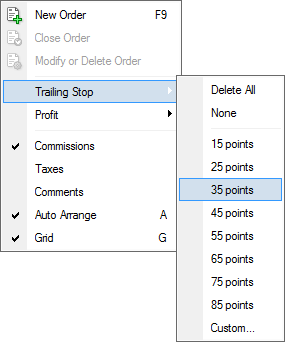


عروض شركات الفوركس
 |  |  |  |  |  |  |  |

 عضو المتداول العربي
 Dynamic Stop Loss
السلام عليكم
هل يوجد ديناميك ستوب لوز سكريبت؟
بمعنى سكربت يغير الستوب لوز تلقائيا بإتباعه السعر
نجد احيانا يحصل تغيير سريع بالسعر و نحتاج للإستفاده من هذا التغير قدر المستطاع بحيث لو فتحنا صفقه شراء مثلا و تعدى السعر سعر الشراء و بدأنا بتحقيق الربح نشغل السكربت بحيت يلحق السعر بالصعود فقط و ليس النزول و يكون مبرمج بعدد نقاط معينيه بالتالي نحقق أقصى ربح بكل راحه و سهوله
و ايضا نحتاجه للعمليه العكسيه بالبيع
عضو المتداول العربي
 رد: Dynamic Stop Loss
وعليكم السلام ورحمة الله وبركاته
نعم اخي الحبيب هذا موجود في برامج التداول ولا يحتاج الى اكسبرت
وهو trailing stop
أو الاستوب المتحرك
فانت تضع استوب للصفقه ثم تختار عدد النقاط الذي اذا تحرك السعر في اتجاه الصفقه تحرك الاستوب معها وهذا لملاحقة السعر والاستفاده باكبر تحرك للسعر
متداول مميز
رد: Dynamic Stop Loss
since you aske for this my friend i would like to give this gift for all arabic trader members
this is an EA and His functions make of this the most powerfull Trailing EA on the earth planet.
This EA has three separate functions: Set Breakeven, Trailing Stop and Scaling Out.
* Works on 4 and 5 digits Broker.
* Works on ECN Brokers.
* Magic number auto-created internally. Works in differents pairs without interfere others EA.
* Switch ON/OFF for each function independently.
* Customizable percent for Scaling Out.
Quik_Trailing automatically adapts to 4 and 5 digits brokers. It works on all MT4 brokers.
-----------------------------------------------------------------------------------------------------
New options
ShowInfo. Set it to false, allows turn all the text off, but it still runs in the background.
AlertSound. Set it to true, emits a sound when First TakeProfit is hit.
AccountIsMicro. Set it to True, develops calculations in Lot Size using 2 digits for First TakeProfit percent.
Set it to False, for use 1 digit in Lot Size calculations for First TakeProfit percent.
-----------------------------------------------------------------------------------------------------
Account Type
* If you account is micro set AccountIsMicro = true.
* If you account is mini or standard set AccountIsMicro = false.
-----------------------------------------------------------------------------------------------------
Scaling out
First TakeProfit Percent is for "scaling out".
Ie, close to 70% (or whatever) of the position and let the rest go on.
If you open a position of 1 Lot, the EA closes 0.7 Lots and keeps open on market the remaining 0.3 Lots.
IE if you work with 0.04, 70% will be rounded to a 0.03.
If you do not want to use this feature, just turn off.
-----------------------------------------------------------------------------------------------------
Use_TrailingStep
Use this function for "trailing" the stoploss when Start_Trailing_At pips profit is reached.
TrailingStep is the amount of pips that will be used to move the Stoploss.
If you use 5, the stoploss will move 5 pips for each 5 pips that the price move in profits, after that Start_Trailing_At pips profit is reached.
------------------------------------------------------------------------------------
Set_Breakeven
Use this function for lock profits.
LockPips is the number of pips -with respect to entry point- in which the EA will put the stoploss when Set_BreakevenAt is reached.
------------------------------------------------------------------------------------
Magic Number
Quik_Trailing works with trades using magic number = 0. (Manual Trades)
This means you can have multiples Trades opened on the same and/or different pairs, set-up the parameters different for the
different charts, and place trades with different stops and TP's depending on which chart/TF/pair you have a signal and that
the EA's WON'T interfere with each other or others EA's.
-------------------------------------------------------------------------------------
Furthermore, now using new option Allow_Drag_PriceLines (by default true) you can:
Change Price for StopLoss, TakeProfit and Stop & Limit orders, directly from the chart.
What ? Are you playing with me ? Come guy... just enjoy it.
Just make double click on the line and later "Drag" the line Up or Down to change the price.
You just need to manually open the trade and Quik_Trailing will do the rest.
عضو المتداول العربي
رد: Dynamic Stop Loss
المشاركة الأصلية كتبت بواسطة محمد العزب
 شكرا أخي الكريم محمد العزب و لكن هالميزه غير موجوده في جميع الشركات و الشركه اللي اتعامل معها لا يوجد عنده هذه الميزه بالميتاتريدر
عضو المتداول العربي
رد: Dynamic Stop Loss
thnx bro
عضو المتداول العربي
رد: Dynamic Stop Loss
شكرا اخي الكريم
لكن الحين زادت الحيره هل يوجد شي اسهل لأن خبرتي بسيطه
متداول مميز
رد: Dynamic Stop Loss
طلبك اخي العزيز رائع ومفيد جدا واعطيتك افضل اداه على الاطلاق للتحكم في هذا الموضوع المهم وهو ادارة الصفقات اليدويه في حال غيابك الاكسبرت بسيط ويجب ان يكون لديك معرفه بسيطه باسماء ادوات الفوركس لتعرف كيف تستفيد منه ...,والشرح موجود في الاعلى اجتهد قليلا...وجرب على الديمو لتمتلك ناصيته ..
عضو المتداول العربي
رد: Dynamic Stop Loss
الشكر لله اخي الحبيب
لو الشركه التي تتعامل معها ميتاتريدر أكيد موجود فيها لانها من خصائص البرنامج
وان كان البرنامج ليس ميتاتريدر ستجد ايضا الخاصيه موجوده لكن طريقة تنفيذها مختلفه
